
Appearance
Download
A beta, for a few people to try
Graph Modeler is not released yet. A beta can be downloaded below. The Windows installer is signed with a certificate, but Windows may still warn the first time, because the signed file is new. The Mac version is not notarized by Apple yet, so macOS warns the first time you open it. Using the beta while it is in testing is free; the license says what applies after the release, and the Pricing page has the price of a commercial license.
Get the beta
This is version 0.1.5, beta 6. See what is new since beta 5.
| Your computer | Download | Size |
|---|---|---|
| Windows 10 or 11, 64-bit | Graph-Modeler-Setup-0.1.5.exe | 121 MB |
| macOS 13 or later, Intel or Apple silicon | Graph-Modeler-0.1.5-universal.dmg | 233 MB |
| Linux, 64-bit, Debian, Ubuntu and relatives | graph-modeler_0.1.5_amd64.deb | 100 MB |
| Linux, 64-bit, anything else | Graph-Modeler-0.1.5.AppImage | 128 MB |
Check the system requirements first: Graph Modeler needs a 64-bit computer. Then install it, and install Graphviz too, to see pictures. Once it is installed, Check for updates on its About tab tells you when a newer version is out.
The release page holds the same files and a list of checksums, so that you can check what you downloaded.
System requirements
Graph Modeler needs a 64-bit operating system on a 64-bit processor. There is no 32-bit version. The program is built on Electron, which stopped publishing 32-bit versions with its release 44.
| System | You need |
|---|---|
| Windows | Windows 10 or 11, 64-bit. Windows 7, 8 and 8.1 are not supported. A 32-bit Windows 10 is refused by the installer, with a message that a 64-bit system is required. |
| macOS | macOS 13 (Ventura) or later, on an Intel or Apple silicon Mac. One download serves both. A Mac that Apple stopped at macOS 12 or earlier, in general one from before 2017, is not supported. |
| Linux | A 64-bit (x86-64) distribution with a desktop, on an Intel or AMD processor. The .deb needs the usual desktop libraries (GTK 3, NSS and a few others), which apt installs for you. There is no ARM version. |
To find out whether your Windows is 64-bit, open Settings, System, About and look at System type. It should say 64-bit operating system.
The app needs about 400 MB of disk space once installed. Graphviz is a separate, small program that draws the pictures; see Install Graphviz. No Node, browser, Java or Excel is needed.
What it has run on
Graph Modeler is a desktop app. During development and testing it has run on:
| OS Family | OS Version / Distro | Hardware Device | Device Year | Graphviz Version | Graphviz installation method |
|---|---|---|---|---|---|
| Microsoft Windows | Windows 11 | Lenovo IdeaPad | 2021 | 16.1 | Graphviz.org's 64-bit Windows installer |
| Apple macOS | macOS 15 Sequoia | Apple iMac | 2013 | 16.1 | brew install graphviz |
| Linux - Ubuntu 24.04 based | Zorin OS 18.1 w/GNOME | Apple iMac | 2013 | 2.42 | sudo apt install graphviz |
| Linux - Debian 13 based | Q4OS 6.10 w/KDE Plasma | Lenovo Thinkpad T400 | 2010 | 2.42 | sudo apt install graphviz |
It has run well on all devices regardless of device age or Operating System.
On each of them the SQL tab was tried with Excel and LibreOffice workbooks, CSV files and Access databases.
The installers for Windows, Linux and the Mac (Intel and Apple silicon together) are each started and checked by an automated test on a computer of that kind. The app needs no Node, browser or other program installed, apart from Graphviz for pictures.
Install
Jump to the instructions for your system:
| Windows .exe | macOS .dmg | Linux .deb | Linux .AppImage |
|---|---|---|---|
| Instructions | Instructions | Instructions | Instructions |
Windows
To see who signed the installer, right-click the downloaded file, choose Properties, open the Digital Signatures tab, select the signature, and click Details, then View Certificate. The certificate is issued to Jeffrey Long. It is valid for only a few days, as the certificates of this kind of signing service are. The signature carries a timestamp from when the file was signed, so it stays good after the certificate ends.
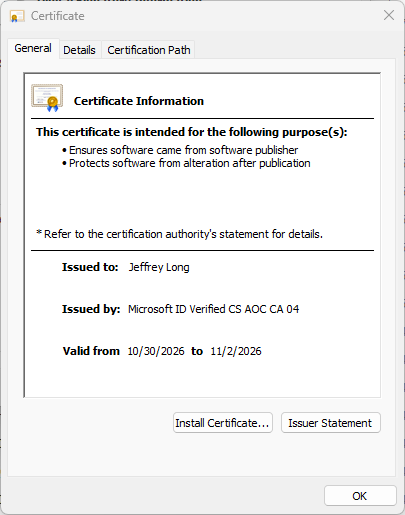
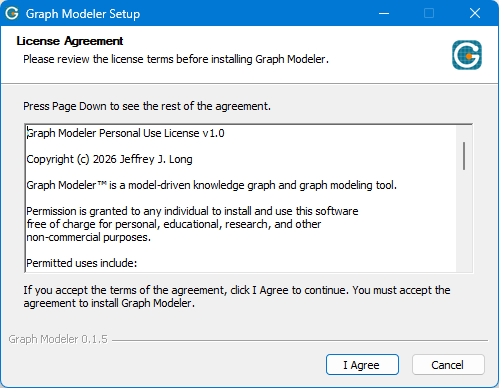
Then run the installer. It begins with the license agreement. Click I Agree, and follow the prompts.
Blocked after the download?
Your browser may say that the file isn't commonly downloaded. The pictures show Microsoft Edge, and other browsers say something similar. The installer is signed, but it is new, and a new file has to be downloaded by enough people before the warning goes away. Open the Downloads list and hover your mouse over the file until the buttons appear.
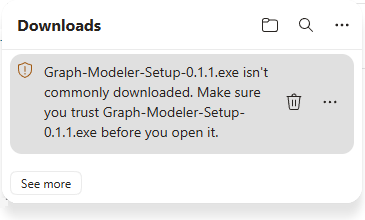
Click the three dots ... on the right, beside the trash can icon, and choose Keep. A dialog asks you to confirm that you trust the file.
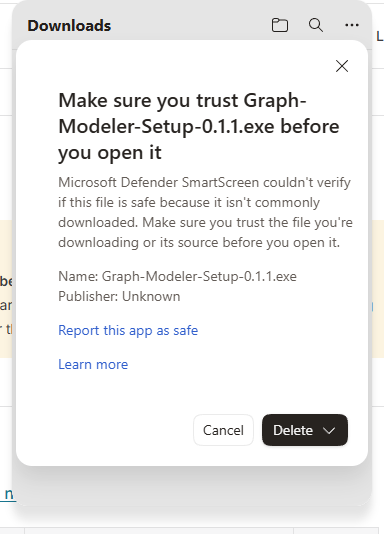
Click the down arrow on the Delete button, and choose Keep anyway. You can now run the installer. If Windows then says Windows protected your PC, click More info, and then Run anyway.
macOS
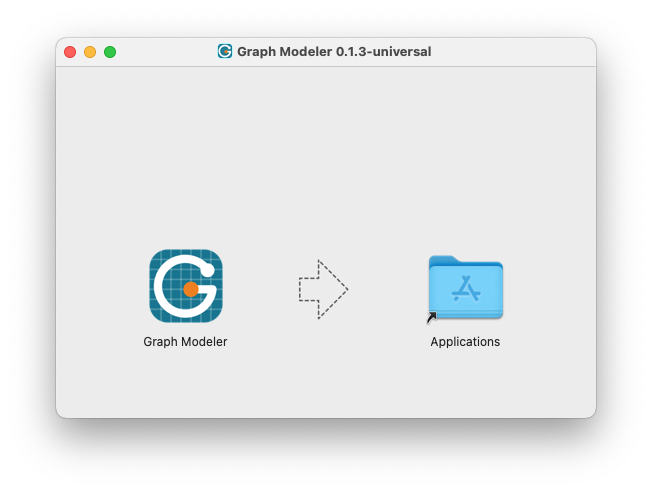
Open the .dmg file you downloaded, and drag Graph Modeler to Applications.
Blocked after the download?
The first time you open Graph Modeler, macOS may refuse with the message "Graph Modeler" Not Opened.
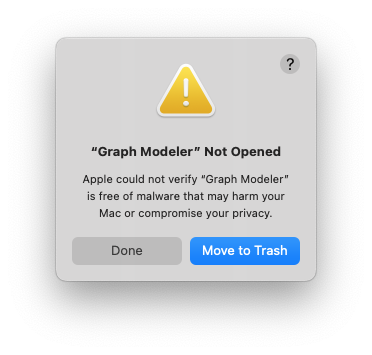
Click Done to close the message. Do not move the file to the Trash.
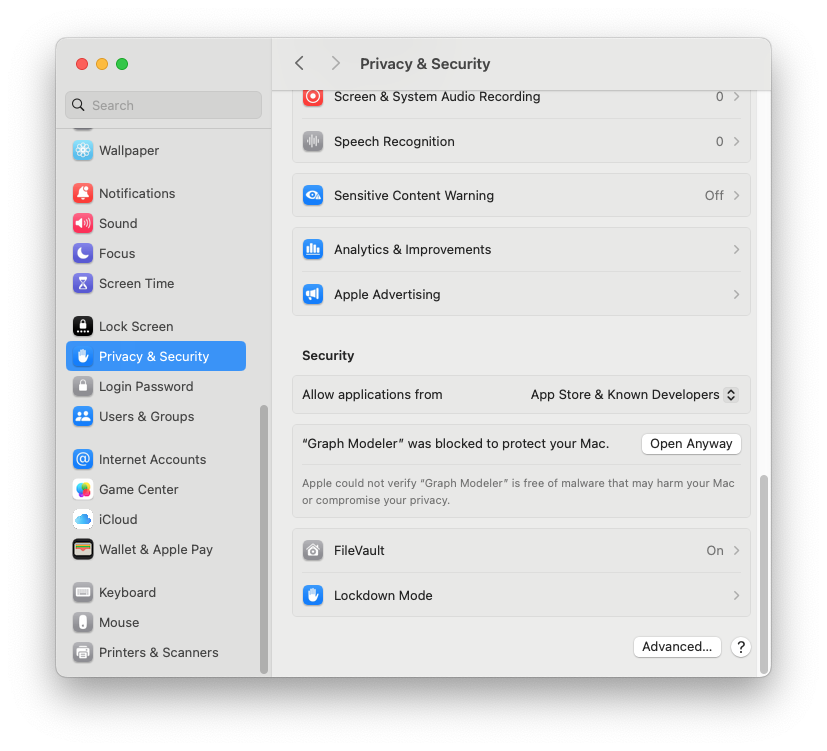
Open System Settings and choose Privacy & Security in the sidebar.
Scroll down to the Security section. Find the message "Graph Modeler" was blocked to protect your Mac, and click Open Anyway.
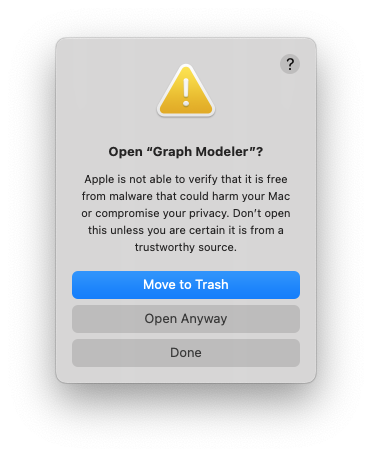
A second warning asks you not to open the app unless you are certain it comes from a source you trust. Click Open Anyway again.
macOS asks for your username and password, to authorize the change. Enter them and click OK. You only have to do this once. You can now start Graph Modeler.
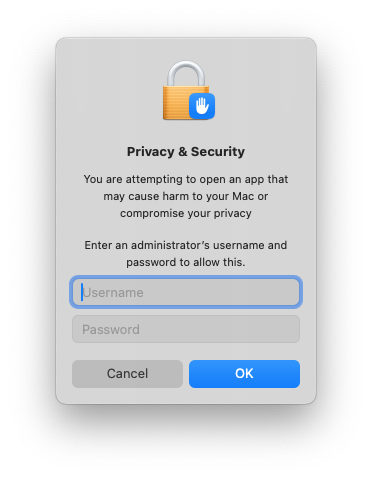
Graph Modeler is not notarized by Apple yet, which is why macOS asks. A Mac that your employer manages may not show Open Anyway. If yours does not, write to support@graphmodeler.com.
Linux .deb
On Debian, Ubuntu and relatives, run this in a terminal, in the folder that holds the download:
sudo apt install ./graph-modeler_0.1.5_amd64.deb
The program appears in the Programming or Development group of the applications menu.
Warning message?
apt may end with a note that the file couldn't be accessed by user _apt. That message is harmless. It only means apt read the file as root, because your Downloads folder is private.
Linux .AppImage
Make it executable with chmod +x Graph-Modeler-0.1.5.AppImage, then run it. A recent Ubuntu also needs sudo apt install libfuse2t64.
Install Graphviz
Graph Modeler draws its pictures with Graphviz, a free program that is installed on its own. The app does not include it and works without it for everything except pictures: the Data, Styles, SQL, Knowledge Graph and DOT tabs, the Designer's settings, and publishing the Knowledge Graph and the DOT file all work with no Graphviz at all.
| System | How to install it |
|---|---|
| Windows | Run the installer from graphviz.org/download, or winget install Graphviz.Graphviz. The installer offers to add Graphviz to the PATH. Say yes if you can, but the app also looks in the usual install folders. |
| macOS | brew install graphviz, with Homebrew. On an older Intel Mac, Homebrew may have to build Graphviz and the programs it needs from source, which can take hours. |
| Debian and Ubuntu | sudo apt install graphviz. |
| Fedora | sudo dnf install graphviz. |
Any recent version should work. The app has been run with versions from 2.42, the one some Linux distributions still package, up to 16.1. Newer versions have more, so a newer one is better where you can choose.
Checking it worked
Open the About tab. The Graphviz line shows the version found, or not found. If you installed Graphviz while the app was open, press the button to look again on the tab that says it was not found, or close the app and start it again, since a program is given its list of places to look only when it starts.
Your data
The SQL tab reads Excel and LibreOffice workbooks (.xlsx, .ods), CSV and TSV files, Access databases and SQLite databases. Nothing has to be installed to read them, and Excel is not needed. On Linux, use a LibreOffice or ONLYOFFICE spreadsheet saved as .xlsx, a LibreOffice .ods file, or a CSV file exported from the program that holds the data.
Check your download
Each release page has a list of checksums, SHA256SUMS.txt, and a signature for it, SHA256SUMS.txt.asc. The checksums say whether your copy is the file that was published. The signature says the list came from Graph Modeler. You do not have to check, but you can.
1. Check the file against the list.
- Linux. In the folder that holds the downloads, run
sha256sum -c --ignore-missing SHA256SUMS.txt. - macOS. Run
shasum -a 256 Graph-Modeler-0.1.5-universal.dmgand compare the result with the line for that file inSHA256SUMS.txt. - Windows. In PowerShell, run
Get-FileHash -Algorithm SHA256 Graph-Modeler-Setup-0.1.5.exeand compare the result with the line for that file. The two are the same when the letters and digits match, whether they are in capitals or not.
2. Check that the list is signed by Graph Modeler. You need GnuPG, which most Linux systems already have.
Download the public key, then run
gpg --import graph-modeler-release-key.asc.Run
gpg --fingerprint support@graphmodeler.com. The fingerprint must be exactly this one:82B4 ECBE 7270 EA17 6430 9DBF 5C39 AD68 084C 132CRun
gpg --verify SHA256SUMS.txt.asc SHA256SUMS.txt. It should say Good signature from "Graph Modeler Releases". A warning that the key is not certified with a trusted signature is normal, because you have not marked the key as trusted.
If the signature is bad, or the fingerprint is different, do not use the file, and write to support@graphmodeler.com. The same fingerprint is in the README of the releases repository, a second place to compare it. The key expires on 27 October 2028, and a new one is published here before then.
Uninstall
To uninstall Graph Modeler:
- Windows. Settings, Apps, Installed apps, Graph Modeler, Uninstall.
- macOS. Drag Graph Modeler from Applications to the Trash.
- Linux.
sudo apt remove graph-modelerfor the.deb; for the AppImage, delete the file.
Your projects and data files are yours and are never touched. The app's own settings and its list of fonts stay behind in a folder named Graph Modeler, which you can delete too: %APPDATA%\Graph Modeler on Windows, ~/Library/Application Support/Graph Modeler on a Mac, and ~/.config/Graph Modeler on Linux. See Fonts.
Coming from the Excel tool
If you use Relationship Visualizer, also called Excel to Graphviz, see Coming from the Excel tool: what opens, what is the same and what is different.
License
Free for personal and non-commercial use, and licensed for commercial use. See License.
Tell me how it went
Write to support@graphmodeler.com, and say how the download and the install went as well as how the app did. In the app, the About tab has a Copy button for your support information: the version and your system, and nothing about your data.